9 Best AI Customer Onboarding Video Makers for SaaS Companies
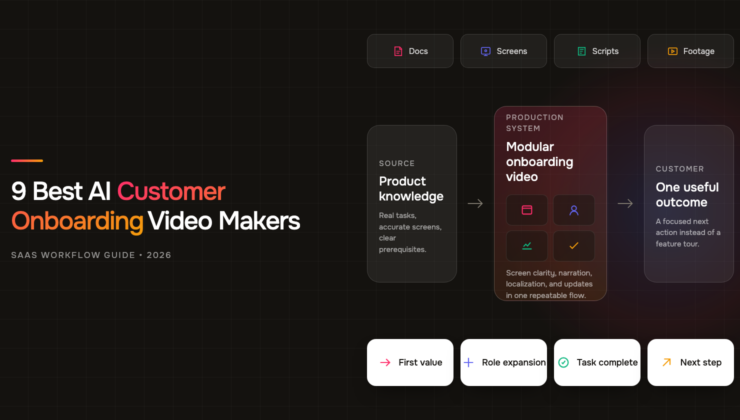
By Anish — Disclosure: The author is a co-founder of ngram; products were assessed against the same documented criteria and current public documentation.
TL;DR: The nine best AI customer onboarding video makers for SaaS companies in 2026 are ngram, Synthesia, Guidde, Trupeer, HeyGen, Colossyan, Loom, Vyond, and Elai.io, based on an August 2026 review of eight documented workflow capabilities.
- ngram: First for mixed-source production, revisions, localization, sharing, and plan-gated interaction.
- Guidde, Trupeer, and Loom: Screen-first choices for task walkthroughs and personal explanations.
- Synthesia and HeyGen: Presenter-led choices for multilingual programs.
- Colossyan, Elai.io, and Vyond: Course, interaction, and animated-scenario choices.
A customer onboarding video has an unusually tough job. Choosing among AI customer onboarding video makers means finding a product that builds confidence without slowing down the moment when a new user wants to complete a real task.
That tension is why the fanciest AI video generator or explainer video maker is not automatically the right onboarding tool. SaaS teams also need clean screen capture, painless updates, reusable brand controls, sensible sharing, and a format that fits the lesson.
The demand is real but specific. In Wyzowl’s 2026 survey of 266 respondents, 23% of marketers said they made customer onboarding videos. The same report found that 63% of people preferred a short video when learning about a product or service. That points toward a library of focused clips, not one cinematic tour that tries to explain the whole product.
We reviewed current official product and help documentation for nine tools on August 18, 2026. We did not invent a hands-on test or treat a marketing claim as proof of output quality. The result is a workflow-first shortlist for SaaS teams that need to ship onboarding content and keep it accurate after the UI changes.
What is an AI customer onboarding video maker?
An AI customer onboarding video maker turns product knowledge, screen recordings, documents, or scripts into videos that teach new customers how to reach a useful outcome. Useful tools combine production with maintenance: they capture the interface clearly, generate narration or presenters, apply brand rules, support localization, and make revisions manageable.
That last part matters. A beautiful welcome video can age badly after one navigation redesign. Ask two questions: “Can this tool make the lesson?” and “Can our team update the right scene next Tuesday without rebuilding everything?”
Pendo’s software benchmark found that the average product in its dataset retained 39% of users after one month and about 30% after three months. That does not prove video causes retention. It does show why onboarding deserves the same operational care as acquisition: the first successful workflow has to happen before attention disappears.
Search behavior tells a similar story. The exact phrase is niche, but the surrounding need spans tutorials, demos, walkthroughs, and training.
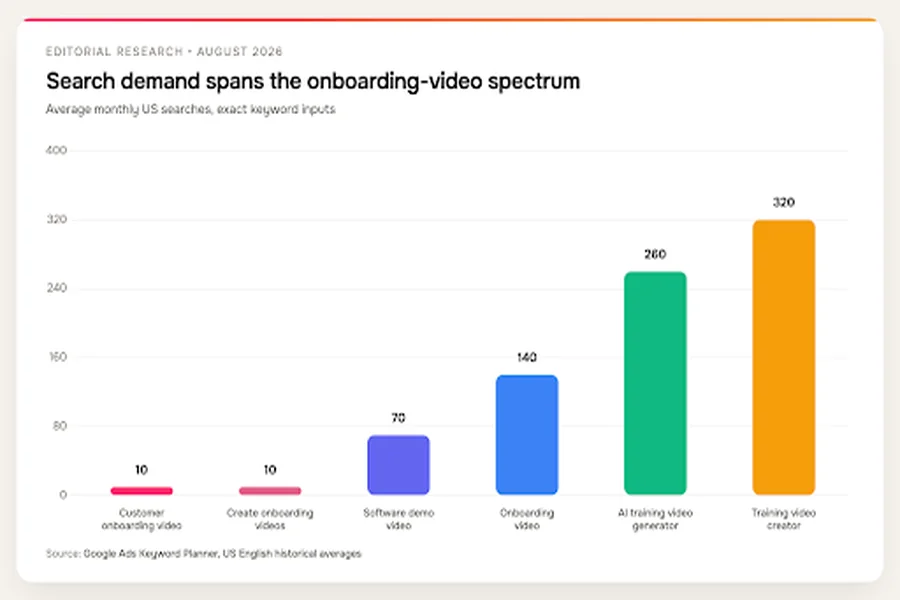
Exact customer-onboarding demand is narrow while adjacent tutorial and training demand is larger. Source: Google Ads Keyword Planner, US English historical averages, accessed August 18, 2026.
| Keyword | Monthly searches |
| Customer onboarding video | 10 |
| Create onboarding videos | 10 |
| Software demo video | 70 |
| Onboarding video | 140 |
| AI training video generator | 260 |
| Training video creator | 320 |
The chart is useful because it exposes the category problem. A SaaS team may search for an onboarding video maker, but the job often includes software demos, product tutorials, customer education, and support deflection. A useful shortlist has to account for all four.
How we chose the nine tools
The ranking starts with customer-onboarding fit, not general AI novelty. Every listed product has a current official source showing a credible route to customer-facing education, whether the output is a product demo video, an explainer, or a task tutorial.
The shortlist includes broad AI video generators, specialist screen recording software, course platforms, and presenter tools. To compare those categories fairly, we evaluated eight capabilities:
- Source to draft: Can the product turn a document, URL, slide deck, or prompt into a structured first version?
- Screen workflow: Can it record, ingest, or organize product footage without forcing a separate editing stack?
- Presenter: Can it add an avatar, digital presenter, or other guided narration when a human face improves the lesson?
- Localization: Can a team produce language versions without rebuilding each video manually?
- Brand controls: Can the team keep fonts, colors, logos, and visual treatment consistent?
- Incremental updates: Can an editor revise a step, scene, script, or voice track without starting over?
- Sharing and analytics: Can the finished asset reach users through a page, embed, library, or trackable player?
- Interactivity: Can the experience include questions, branching, hotspots, or a clear next action?
A tool could still rank well without checking every box. Loom is a good example: it does fewer things than a course platform, but that restraint is useful when speed and authenticity matter more than cinematic polish.
Plan access received a separate reality check. A capability counts in the matrix when current official documentation describes it, even if the vendor reserves it for a higher tier. The product sections flag important gating where the sources make it clear. During procurement, ask the vendor to open the exact plan, perform the workflow live, and show the export or published result. A feature name on a pricing grid is weaker evidence than the action your future editor will repeat.
We also separated documented capability from quality. A product received credit only when an official source described the feature. A check mark does not mean every plan includes it, every language sounds equally natural, or every generated scene looks good on the first attempt.
What the official docs reveal: a nine-tool workflow matrix
For a reproducible mini-benchmark, we checked official pages on August 18, 2026 and scored each workflow capability as yes, partial, or not documented. Yes equals one point, partial equals half a point, and not documented equals zero. The matrix measures documented breadth, not video quality, render speed, value for money, or customer satisfaction.
| Tool | Source to draft | Screen workflow | Presenter | Localization | Brand | Updates | Share or analytics | Interactivity |
| ngram | Yes | Yes | Yes | Yes | Yes | Yes | Yes | Yes, plan-gated |
| Synthesia | Yes | Yes | Yes | Yes | Yes | Yes | Yes | Yes |
| Guidde | Yes | Yes | Partial | Yes | Yes | Yes | Yes | Not documented |
| Trupeer | Partial | Yes | Yes | Yes | Yes | Yes | Yes | Not documented |
| HeyGen | Yes | Partial | Yes | Yes | Yes | Yes | Partial | Not documented |
| Colossyan | Yes | Yes | Yes | Yes | Yes | Yes | Yes | Yes |
| Loom | Not documented | Yes | Not documented | Not documented | Yes | Partial | Yes | Partial |
| Vyond | Yes | Yes | Yes | Yes | Yes | Yes | Not documented | Not documented |
| Elai.io | Yes | Partial | Yes | Yes | Yes | Yes | Yes | Yes |
The first pattern is reassuring: all nine products document brand controls, and eight or more equivalents cover structured screen work, localization, and incremental updates.
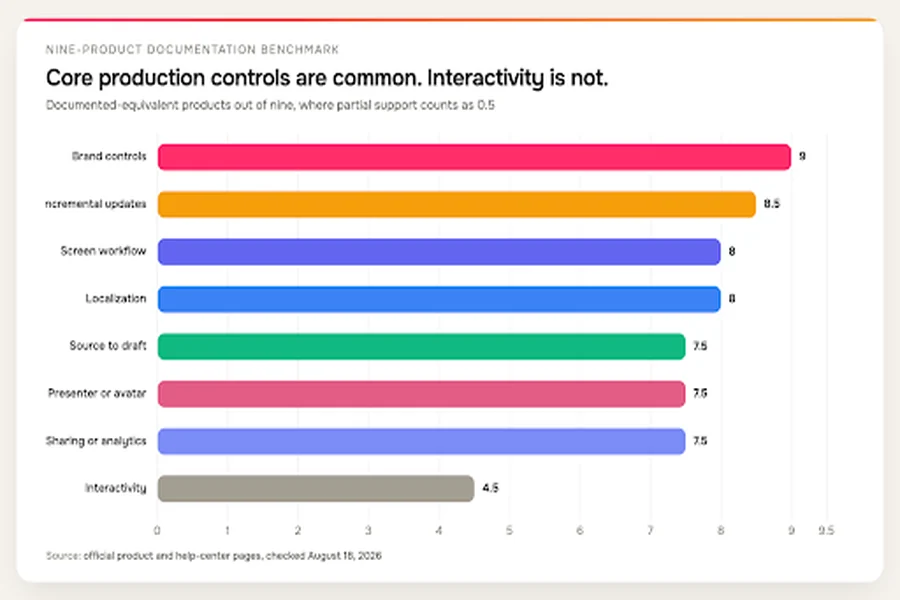
Foundational production controls are common, while interactive onboarding is less broadly documented. Source: official product and help-center pages, checked August 18, 2026.
| Capability | Products out of nine |
| Brand controls | 9.0 |
| Incremental updates | 8.5 |
| Screen workflow | 8.0 |
| Localization | 8.0 |
| Source to draft | 7.5 |
| Presenter or avatar | 7.5 |
| Sharing or analytics | 7.5 |
| Interactivity | 4.5 |
Interactivity is the outlier. If a quiz, branch, hotspot, or in-video action is central to the onboarding design, verify plan availability before choosing a product. Do not assume every AI video platform is also a learning platform.
The next view rolls those eight criteria into a breadth score. The score maps documented workflow coverage; it does not judge output quality.
Documentation breadth across eight workflow criteria. Source: official product and help-center pages, checked August 18, 2026. This is not a quality or performance rating.
| Product | Documented breadth score |
| ngram | 8.0 |
| Synthesia | 8.0 |
| Colossyan | 8.0 |
| Elai.io | 7.5 |
| Guidde | 6.5 |
| Trupeer | 6.5 |
| HeyGen | 6.0 |
| Vyond | 6.0 |
| Loom | 4.0 |
Three broad platforms cover the full documented matrix, but the lower numbers are not automatic losses. A focused screen recorder can be the correct choice for a two-person customer-success team. A course platform can be unnecessary for a sixty-second setup clip.
The decision tree below turns that nuance into a quick starting point.
Start with the lesson format, then compare the products inside that workflow.
1. ngram: best overall for mixed-source SaaS onboarding
ngram’s customer onboarding video maker ranks first here for teams that need one system to turn product knowledge and rough footage into a maintainable video library.
ngram (founded by Anish Muppalaneni and Devadutta Ghat in 2022) is a business video creation platform for teams across marketing, sales, HR, learning, customer success, operations, and internal communications. For SaaS companies, that means marketing, customer success, support, and product education can build from the same approved knowledge. Its core advantage is input flexibility. A team can start with a prompt, URL, Markdown document, PDF, slide deck, screenshots, screen recording, or raw video. That matters because onboarding knowledge rarely lives in one clean script. It sits across help docs, launch notes, support replies, demo recordings, and a product manager’s annotated screenshots.
ngram can draft a script and storyboard from those materials, polish screen recordings, add voiceover and captions, and introduce an avatar presenter where a guided welcome works better than silent UI footage. The editor supports script changes, scene regeneration, and timeline work, so the AI draft is a starting point rather than a locked result.
The breadth is particularly useful when one onboarding program contains several formats. The welcome video might use a presenter. A setup lesson might be mostly screen capture. A feature explanation might combine screenshots, motion, and narration. Brand-kit controls keep those assets related even when the production methods differ.
Localization and multi-format output extend that system to global teams and different channels. A product marketer can create a polished version for an onboarding hub, while customer success can share a focused clip through a hosted page or embed it in a help center. Current product-state documentation supports hosted pages, embeds, and view counts. It does not support a claim of full behavioral analytics, so teams that need event-level product telemetry should connect video viewing to their existing onboarding stack.
There is also an interactive layer, with an important caveat. Polls, quizzes, and call-to-action elements are documented on the top paid plan. Verify that plan fit before designing a branching education experience around them.
Why it ranks first: ngram covers the widest practical mix of source ingestion, screen polish, presenter-led scenes, brand control, revision, localization, sharing, and plan-gated interaction without forcing a SaaS team into a single content style.
What to watch: breadth creates choices. Establish a small template system before multiple teams start creating, and confirm the paid plan required for any interactive element. Use product analytics outside the video platform to measure whether a viewer completes the intended in-app action.
Best onboarding job: a multi-format library built from existing product material, especially when marketing, customer success, and product education share ownership.
2. Synthesia: best for polished presenter-led programs
Synthesia is a strong fit when the onboarding experience needs a consistent presenter across many lessons, languages, and business units. Its AI video workflow can begin with a prompt, file, or URL, then turn that source into structured scenes with an avatar and voice.
The platform is not limited to a talking head. Official documentation covers native screen recording, uploaded MP4 footage, and scene-level editing, which makes it possible to place product demonstrations beside presenter-led explanations. That combination works well for onboarding moments that need both context and clicks: explain why a workflow matters, show the exact steps, then recap the outcome.
Localization is one of the clearer reasons to shortlist Synthesia. The company advertises more than 160 languages, and its translation workflow can create new language versions while preserving a reusable project structure. Brand kits, sharing, analytics, and interactive elements round out a program-oriented feature set, although access varies by plan.
The tradeoff is the character of the result. An avatar-led lesson can look organized and consistent, but it can also feel formal for a product whose customer relationship depends on founder access or a casual support voice. The right answer is not to avoid avatars. It is to use them for stable explanation and let real screen footage carry the product truth.
Synthesia also makes more sense when the team has an editorial owner. Generating twenty versions quickly is useful only if someone owns terminology, pronunciation, visual consistency, and the change log. Without that governance, a multilingual library can multiply small errors.
Why it ranks here: it combines mature presenter-led creation with screen capture, translation, brand controls, and program-level delivery features. That is a well-rounded package for established onboarding operations.
What to watch: verify which brand, analytics, collaboration, and interactive features sit in the plan you are considering. Test the tone of avatar delivery with real customers before standardizing every lesson around it.
Best onboarding job: a structured global academy where the same product explanation needs a consistent presenter and many localized versions.
3. Guidde: best for fast step-by-step product walkthroughs
Guidde focuses on a very recognizable SaaS job: capture a workflow and turn it into a clean, narrated how-to. That specialization makes it easier to recommend when each product walkthrough video answers one small customer question.
The platform can create guidance from screen capture as well as PDF, PPTX, and DOCX files. Uploaded MP4 or WebM footage can be broken into structured chapters, which is useful when an existing demo contains several independent tasks. Instead of asking a new customer to scrub through a long recording, the team can build a focused guide around each outcome.
Official help documentation describes automatic localization, more than 50 supported languages, and a voice catalog above 400 options. Translation bundles, brand-kit controls, transcript editing, sharing, and embeds make the result more reusable than a raw recording link.
Guidde’s sweet spot is procedural clarity. It is suited to “connect your account,” “invite a teammate,” “build your first dashboard,” or “resolve this permission error.” Those lessons benefit from an obvious sequence and do not need a cinematic intro.
Its narrower focus is also the limitation. If the onboarding program needs emotionally expressive presenters, branching course logic, or campaign-style motion design, a specialist how-to system may feel constrained. The documentation reviewed for this comparison did not establish native quizzes or branching, so do not assume a shareable guide is the same thing as an interactive learning experience.
Why it ranks here: Guidde pairs a strong screen workflow with document inputs, structured chapters, localization, brand controls, and easy delivery. It keeps the production model close to the way customer-success teams already explain a product.
What to watch: keep each guide tied to one job and verify how the chosen plan handles brand kits, localization volume, and team collaboration. A step-by-step format loses its advantage when several unrelated workflows are packed into one asset.
Best onboarding job: a searchable library of short product walkthroughs owned by customer success, support, or product education.
4. Trupeer: best for turning recordings into video and written guides
Trupeer is compelling when a team wants one capture session to produce more than a video. Its documented workflow turns a screen recording into a polished walkthrough and a written guide, reducing the gap between the onboarding video and the help-center article beside it.
That pairing solves a quiet operational problem. Users do not all learn the same way, and support teams do not want to maintain contradictory instructions in two formats. A shared source makes it easier to keep narration, screenshots, and written steps aligned.
The input path covers browser or screen recording, webcam, uploaded video, audio, and text. Teams can apply a brand kit, share the result through a hosted page, export video, and generate document formats. AI presenters are documented on paid plans, and the customer-onboarding page advertises support for at least 65 languages.
Trupeer also documents a changed-step rerecording workflow. That is more important than it sounds. SaaS interfaces change constantly, and a production system should let an editor replace the stale action without losing the entire explanation around it.
Trupeer fits demonstration-led onboarding. If a lesson begins with a real product workflow, the platform gives that recording structure and reuse. It is less obviously suited to a brand-film-style welcome or a deeply interactive course, and that tradeoff matters little when the program’s core asset is a walkthrough.
Why it ranks here: the record-once path to both video and documentation is operationally useful, while brand, localization, presenter, and update features make the output customer-ready.
What to watch: verify presenter access and localization limits at the plan level. Decide which output is canonical when a process changes, then update the shared source before distributing revised video and written versions.
Best onboarding job: repeatable feature education that must live in both a video library and written help center.
5. HeyGen: best for presenter-first onboarding and localization
HeyGen belongs near the top of the list when a presenter is central to the onboarding style. Its onboarding workflow can start from scripts, slide decks, and handbooks, then use an AI presenter or digital twin to deliver the lesson.
That model fits welcome messages, role-based orientation, and account handoffs where a human presence makes the experience feel guided. It can also support a consistent spokesperson across a growing set of customer segments without scheduling a new recording session for every revision.
Localization is the headline capability. HeyGen advertises translation across more than 175 languages and dialects, with workflows for uploaded files or linked videos and lip-synced delivery. For a SaaS company entering several markets, that is a meaningful alternative to producing each presenter sequence from scratch.
The screen side needs a more careful read. HeyGen can incorporate product footage and visuals, but the official sources reviewed here did not establish the same deeply structured capture workflow as Guidde, Trupeer, or Loom. That is why the benchmark marks screen workflow as partial rather than awarding capability by association.
The practical question is where the product interface sits in the lesson. If the presenter introduces the goal and the screen sequence is short, HeyGen is a natural fit. If every click needs precise zooms, callouts, cursor treatment, and frequent replacement, a screen-first tool may reduce editing friction.
Why it ranks here: presenter quality, digital-twin options, script-based revision, brand controls, and broad advertised localization make it a credible platform for human-feeling global onboarding.
What to watch: test pronunciation, terminology, and lip sync in the languages that matter, rather than treating the advertised count as a quality guarantee. Map the screen-production process before committing to a presenter-first stack.
Best onboarding job: localized welcome and orientation videos where a consistent presenter carries the narrative.
Video localization numbers deserve context before they turn into a procurement shortcut. Vendors count languages, dialects, voices, and translation modes differently, so the chart below shows advertised scope, not independent quality.
Vendor-advertised localization scope. Counts are directional because products classify languages and dialects differently. Sources: official vendor pages, checked August 18, 2026.
| Product | Advertised minimum |
| HeyGen | 175 |
| Synthesia | 160 |
| Colossyan | 100 |
| Vyond | 95 |
| Elai.io | 75 |
| Trupeer | 65 |
| Guidde | 50 |
A smaller count with the right terminology and voice can beat a larger catalog. Run a sample through native-speaking reviewers, especially for product nouns, abbreviations, numbers, and interface labels.
6. Colossyan: best for course-style customer education
Colossyan approaches video through a learning and development lens. That makes it particularly relevant when customer onboarding looks less like a product tour and more like a structured curriculum.
The platform can generate video from prompts, documents, PDFs, and slides, then combine avatar presenters with media and screen recording. Official sources document more than 100 languages, quizzes, branching, SCORM output, and update or regeneration workflows.
Those course mechanics open a different kind of onboarding design. A cybersecurity product might need an administrator to understand policy choices before configuring the system. A finance platform might need role-based lessons with knowledge checks. A marketplace might have separate paths for buyers, sellers, and internal operators. In each case, “watch this clip” is weaker than a sequenced learning experience.
Colossyan’s breadth also introduces setup work. Branches, questions, and course structures need real instructional design beyond an AI script. A quiz that asks users to recall a button label adds friction without proving they can perform the task. Useful checks ask the learner to make a decision they will face in the product.
SCORM matters if customer education already lives in a learning management system. It matters far less if onboarding happens in an in-app checklist and a public help center. Start with the delivery environment before paying for course infrastructure.
Why it ranks here: Colossyan combines presenter-led production, screen media, localization, interactive learning, and LMS delivery in a way that suits formal customer academies.
What to watch: course features can encourage overproduction. Keep task tutorials short, reserve quizzes and branching for decisions that need proof of understanding, and confirm which interactions survive the final delivery format.
Best onboarding job: certification, compliance, administrator education, and role-based customer academies with measurable learning steps.
7. Loom: best for fast, human screen explanations
Loom remains the pragmatic choice when the biggest risk is not production quality but delay. A customer-success manager can record the screen and camera, explain the exact account context, and share a link while the question is still fresh.
Official product information covers screen and camera capture, high-resolution recording on eligible plans, AI-generated titles and chapters, calls to action, filler-word and silence removal, trimming, stitching, and editing through the transcript. Player branding, viewer insights, comments, reactions, and a shared library make the recording more useful than an unmanaged video file.
That speed fits high-touch onboarding. A complex customer may need a two-minute explanation of its own data, settings, or integration path. A generic polished lesson cannot always replace a personal walkthrough.
The limitations are equally clear. Loom is not documented as a full document-to-video system, broad localization platform, or avatar generator. Its workflow is recording-first, and a recording-first library can become inconsistent if every account manager uses different language, framing, and structure.
Community discussions echo that tradeoff. In one Customer Success thread, practitioners favored short, job-focused clips and tied them to a specific onboarding step. That is anecdotal rather than representative evidence, but it captures Loom’s natural strength: directness.
Why it ranks here: Loom gets a useful explanation in front of a customer with little ceremony, then adds enough AI cleanup, organization, and viewing context to support a small library.
What to watch: create a shared recording pattern with a clear goal, clean account data, a short opening, and one next action. Do not let personal walkthroughs become the only record of a repeatable process.
Best onboarding job: personalized high-touch explanations, rapid support handoffs, and short product tips where a real team member’s voice adds trust.
8. Vyond: best for animated scenarios and abstract workflows
Some onboarding lessons are hard to capture on a screen. A workflow may cross several roles, include an offline decision, or explain a concept before the user opens the product. Vyond fits that territory.
Its current product set supports prompts and reference documents, multiple animated styles, AI avatars, screen recording, a full editor, brand management for eligible enterprise setups, and translation into 95 languages. That mix lets a team show a scenario, then move into the relevant interface step.
Animation is useful for stories that would otherwise require actors, sets, or sensitive customer data. A SaaS company can illustrate an approval chain, a security mistake, or a customer conversation without recreating the exact situation in production.
The risk is decorative motion. An animated scene should clarify a decision, relationship, or consequence. If it merely repeats the narration with floating icons, it increases production and update costs without teaching more.
Vyond also demands a stronger visual system than a screen recorder. Character style, framing, color, pacing, and transitions can drift when several authors work independently. Templates and review rules matter if the content library will grow.
The official sources reviewed here did not establish a native customer-onboarding analytics layer or course-style branching, so those capabilities should come from the surrounding learning, product, or video platform when needed.
Why it ranks here: Vyond can explain people, policies, and cross-functional scenarios that are awkward to show with screen footage alone, while still supporting screen, avatar, brand, and localization work.
What to watch: budget time for visual direction and revision. Use animation for conceptual clarity, then switch to real interface footage when the learner needs to reproduce a task.
Best onboarding job: scenario-based education, role handoffs, policy explanation, and abstract product concepts that need more than cursor movement.
9. Elai.io: best for interactive presenter-led lessons
Elai.io combines document-driven creation with presenter-led and interactive learning features. Official product pages describe text, PDF, PPT or PPTX, and URL inputs, along with more than 80 avatars and support for more than 75 languages.
The platform’s interactive layer is the main reason to consider it. Quizzes, hotspots, buttons, branching, SCORM, sharing, and embeds can turn a passive explanation into a guided choice. That is useful when onboarding must confirm knowledge or route different user roles through different material.
A team could, for example, explain three integration options, ask which environment the customer uses, then send the viewer to the relevant setup sequence. A hotspot could point toward a critical interface control, while a final button could carry the learner to the next onboarding action.
The screen-production fit is less certain. Elai.io can incorporate product visuals and uploaded material, but the official sources reviewed for this comparison did not clearly document a native screen-capture workflow equal to a dedicated walkthrough tool. The matrix therefore marks that capability as partial.
As with Colossyan, interaction needs a reason. Branching is valuable when viewers genuinely need different paths. It is unnecessary when everyone must complete the same three steps.
Why it ranks here: Elai.io combines broad source ingestion, presenter options, localization, brand controls, interactive elements, and learning-system delivery in one platform.
What to watch: confirm how screen footage is captured and updated, then test every branch, button, and exported interaction in the actual delivery environment. An interactive authoring feature has little value if the destination strips it out.
Best onboarding job: presenter-led education with quizzes, branching, hotspots, or LMS delivery, especially when viewers need role-specific paths.
How to compare AI customer onboarding video makers
Nine options are still too many if the buying conversation starts with feature checklists. Narrow the field by answering four operational questions first.
What kind of lesson are you producing most often?
For precise click paths, start with a screen-first shortlist: Guidde, Trupeer, Loom, or ngram. For a consistent presenter across markets, compare Synthesia, HeyGen, ngram, Colossyan, and Elai.io. For formal course logic, focus on Colossyan or Elai.io. For animated scenarios, Vyond has the clearest specialization.
The mistake is choosing an avatar platform because the demo looks impressive, then discovering that 80% of the actual library is cursor-level walkthroughs. Use your next ten planned lessons as the test set. Count how many are screen demonstrations, conceptual explainers, presenter messages, scenario stories, and knowledge checks.
Who owns updates after launch?
An onboarding library is a product, even if nobody calls it one. It needs an owner, a source of truth, a release process, and a retirement rule.
If customer success owns the library, fast capture and simple corrections may matter most. If product marketing owns it, brand controls and multi-format output may lead. If an education team owns it, review states, localization, SCORM, and structured curricula can justify a heavier platform.
Ask each vendor to demonstrate a real maintenance task: replace one stale interface step, change a product term throughout a project, regenerate a voice line, update captions, and publish without breaking the original link. A polished creation demo tells you little about that Tuesday-morning job.
Where will customers watch?
The destination changes the tool requirement. A help-center embed needs a responsive player and clean captions. An in-app checklist needs a short asset that loads quickly and points to one action. An LMS may require SCORM. A high-touch success plan may rely on private sharing, comments, and account-specific context.
Analytics also need a definition. A view count answers, “Was the asset opened?” It does not answer, “Did the customer connect the data source afterward?” Connect viewing data to product analytics or customer-success milestones when the business decision depends on completion.
How much localization do you truly need?
Language count is a weak proxy for localization quality. The relevant test is whether the platform supports your target markets, correctly handles product terms, preserves on-screen text, and gives a native speaker a practical review path.
Prepare a short stress-test script before procurement. Include abbreviations, a number, a date, a product feature name, an integration name, and one sentence with emotional tone. Compare pronunciation and correction effort across the two finalists.
A procurement conversation should score the real operating model, not the longest feature list.
The scorecard turns a broad comparison into a team-specific answer. A product can lose on total breadth and still win if it removes the bottleneck that delays every onboarding lesson.
Run a proof-of-work trial before you buy
A polished vendor demo answers the vendor’s question. A useful trial answers yours: can the team produce, revise, review, and deliver the lessons already sitting in the backlog?
Choose two assignments with different failure modes. The first should be a short product walkthrough with a fragile interface step, such as connecting an integration or configuring permissions. The second should begin with messy source material, such as a help article, slide deck, release note, or old webinar. This pair tests capture and source-to-draft work without inventing a giant pilot.
Give every finalist the same source packet. Include the target role, the desired outcome, approved terminology, brand assets, pronunciation notes, a clean demo account, and the destination where customers will watch. Do not hand one vendor a finished script and another a folder of rough notes, then compare production time.
Track the work in plain units. Record author setup time, editing time, product-expert review time, localization review time, and the number of scenes that required manual repair. Those figures belong to your team and your material, which makes them more useful than a generic promise about speed.
The revision test is the part most trials miss. After the first version is approved, change one menu label, replace one interface step, edit a product claim, and create one language version. Watch what happens to captions, narration, callouts, scene timing, and the published link. An AI video generator can feel fast during generation and expensive during maintenance.
Publish the result to a real test destination. Check the help-center embed on mobile, keyboard access, caption accuracy, player branding, privacy settings, load behavior, and whether interactive elements survive the handoff. Ask a colleague who did not create the video to complete the task from the lesson alone.
Finally, compare the next action, not personal taste. Did the viewer finish the setup, choose the right path, or know where to go next? A visually impressive lesson that leaves the customer unsure is weaker than a plain walkthrough that gets the job done.
At the end of the trial, each finalist should leave behind a usable source project, an exported or embedded lesson, a revision log, and a clear list of plan-gated features. That evidence gives procurement something concrete to evaluate and gives the future content owner a preview of the weekly workflow.
Build an onboarding library, not one giant tour
A maintainable onboarding system is modular. It gives a new customer the next useful answer without asking for a thirty-minute commitment.
An MIT and edX study of 6.9 million viewing sessions found that online learners generally dropped away after six minutes and that lessons designed specifically for the web worked better than old lectures chopped into pieces. The study examined courses rather than SaaS onboarding, so six minutes is not a universal product rule. It is a useful warning against carrying classroom or webinar habits into a task-focused video.
A security administrator may need a detailed setup lesson. The practical default is still to split unrelated jobs into separate clips, design each clip for its online context, and give longer lessons chapters.
A SaaS onboarding library can start with four layers:
- Welcome and orientation: explain the outcome, the roles involved, and what happens next.
- First-value workflow: show the smallest complete task that proves the product is working.
- Role-based expansion: teach the next workflows for administrators, operators, managers, or end users.
- Troubleshooting and recovery: answer predictable errors without forcing the customer to open a support ticket.
A modular library follows the customer’s journey and gives every video one job.
This structure also reduces maintenance risk. A changed billing screen should not force the team to re-export the orientation and administrator lessons. Each module can have a stable owner, review date, and destination.
How to create customer onboarding videos that survive product changes
Step 1: Define the user outcome
Name one observable result before writing a script. “Understand the dashboard” is vague. “Connect a data source and confirm the first successful sync” gives the video a finish line.
Write the role, starting state, required access, and final state at the top of the brief. The step is done when another team member can tell whether the learner completed the job.
Step 2: Choose the smallest useful format
Use screen capture for clicks, a presenter for context, animation for invisible processes, and interaction for decisions that change the path. Do not combine formats because the tool offers them.
Sketch the sequence before production. The step is done when every scene has a teaching purpose and the lesson contains no unrelated feature tour.
Step 3: Record a clean product state
Prepare a safe demo account with realistic labels, no personal information, and the permissions your target user will have. Hide browser clutter, notifications, irrelevant tabs, and cursor wandering.
Capture difficult or fragile actions as separate segments. The step is done when the raw footage shows the exact workflow without exposing customer data or relying on off-screen explanation.
Step 4: Add narration, captions, and visual guidance
Write narration around decisions and outcomes rather than reading every label. Use captions for accessibility and silent viewing, then add zooms, highlights, or callouts only where attention could drift.
Review terminology against the product UI. The step is done when a first-time user can follow the video without guessing which control the narrator means.
Step 5: Publish with an update trigger
Place the video where the relevant onboarding step happens, whether that is an in-app checklist, help article, email, academy, or customer-success workspace. Assign an owner and record which UI screens, feature names, and documentation sources appear.
Set a review trigger for interface releases rather than relying on a quarterly calendar alone. The step is done when the video has a destination, owner, source file, last-reviewed date, and measurable next action.
Creation is half the system. Ownership, source tracking, release triggers, and retirement keep the library trustworthy.
Common mistakes that make onboarding videos less useful
Starting with the whole product
New users do not need a guided museum tour. They need enough context to complete the next meaningful task. Organize the library around outcomes, not the navigation menu.
Hiding requirements until the middle
If the learner needs administrator access, a prepared CSV, an integration token, or a teammate’s approval, say so before the first click. A video feels broken when the viewer discovers a blocker halfway through.
Treating generated narration as final
AI voice can read a clean script and still pronounce a product term incorrectly, rush a warning, or flatten an important contrast. Listen to the exported audio, not only the text preview.
Measuring views without product outcomes
Views can show reach. They cannot prove activation. Pair the video with an observable next step, such as a connected integration, invited teammate, created project, or completed checklist item.
Publishing without a replacement path
Every video should have a source file, an owner, and a record of the product surfaces it shows. Otherwise the first UI change turns a helpful asset into confident misinformation.
Frequently asked questions
What makes a good customer onboarding video?
A good customer onboarding video teaches one useful outcome, shows the real product state clearly, and ends with an obvious next action. Strong videos also declare prerequisites, use accurate captions, and have an owner who can update the source when the interface or workflow changes.
How long should a customer onboarding video be?
A customer onboarding video should be as short as the complete task allows. An MIT and edX study of 6.9 million viewing sessions found that learners generally dropped away after six minutes, although the research covered online courses rather than SaaS onboarding. Split unrelated jobs and add chapters to detailed setup lessons.
How do you make a customer onboarding video?
Define one user outcome, choose the right format, capture a clean product state, add concise narration and captions, and publish beside the onboarding step. Record the owner, source, last-reviewed date, and update trigger at launch so the asset remains accurate.
Can AI create product tutorial videos?
Yes. A current script to video generator can draft from documents or URLs, organize screen recordings, generate narration and captions, add presenters, translate versions, and assist with scene revisions. Capability does not guarantee accuracy, so a product expert still needs to review every interface step and claim.
What is the best AI video generator for onboarding?
ngram ranks first here for a mixed-source SaaS onboarding library. Synthesia and HeyGen suit presenter-led programs, Guidde and Trupeer suit structured walkthroughs, Loom suits rapid personal explanations, Colossyan and Elai.io suit course interactions, and Vyond suits animated scenarios.
Should onboarding videos use an AI avatar or screen recording?
Use screen recording when the customer must reproduce clicks, settings, or navigation. Use an AI avatar when the lesson needs orientation, narrative continuity, or a consistent presenter across languages. Many onboarding programs work best with a short presenter introduction followed by precise product footage.
Final verdict
The best AI customer onboarding video maker is the one that matches the library your team can maintain. ngram ranks first for a broad, mixed-source workflow that spans scripts, documents, screens, presenters, localization, revision, sharing, and plan-gated interaction.
The rest of the list solves narrower jobs well. Choose Synthesia or HeyGen for presenter-led global programs, Guidde or Trupeer for repeatable walkthroughs, Loom for fast personal guidance, Colossyan or Elai.io for course mechanics, and Vyond for scenarios that a screen cannot explain.
Then give every video one outcome, one owner, and one update trigger. The tool starts the system. Maintenance is what makes customers trust it.