How to Download Game of Thrones All Seasons [3 Ways]

As one of the most beloved TV series ever, Game of Thrones captivates millions of fans around the globe. Instead of streaming online, it is more convenient and flexible to download HBO Max shows on PC for offline watching. Want to know how to download all 8 seasons of Game of Thrones for offline viewing without any limitations? This guide will introduce you to 4 simple ways to safely download Game of Thrones, using official apps and useful download tools.
How to Download Game of Thrones with Max APP
HBO Max holds the rights to Game of Thrones and offers an official way to download the series through its built-in download feature. If you have an active subscription, you can download full episodes directly to your device for offline viewing without a third-party HBO Video Downloader. Although this method is official and straightforward, it has some limitations:
- You must maintain an active HBO Max subscription at all times.
- Downloaded content cannot be transferred to other devices or saved permanently.
- HBO Max does not allow downloading Game of Thrones on computers.
To download the show using HBO Max, follow these steps:
Step 1. Access the HBO Max app on the device where you want to watch offline. Log in with your active subscription credentials.
Step 2. Open the app and search for “Game of Thrones” using the search bar. Select the season or episode you wish to download.
Step 3. Tap the download icon next to the episode to begin downloading.
Step 4. After the download completes, go to the “Downloads” section to watch the episodes offline.
How to Download Game of Thrones via SaveFrom
SaveFrom is a free online tool that enables users to download video or audio content from various websites, including HBO Max. It can be a good option for those wanting to download Game of Thrones episodes without an HBO Max subscription. However, because of Max’s DRM protections, it does not consistently support direct downloads from HBO Max. Additionally, when using SaveFrom.net, users might encounter pop-up advertisements or be redirected to other sites, which could pose risks such as malware or phishing.
To download Game of Thrones episodes using SaveFrom:
Step 1. First, go to the website where Game of Thrones is available for streaming (such as third-party streaming platforms that allow public sharing) and copy the video’s URL from the browser’s address bar.
Step 2. Next, open your browser and visit the SaveFrom.net website. Paste the copied video link into the input field on the homepage.
Step 3. After the link is processed, select your desired video resolution and format.
Step 4. Finally, click the “Download” button to start saving the Game of Thrones episode to your device.
Download Game of Thrones & Watch offline Easily
Instead of depending on unreliable torrents or questionable online video downloader tools, Keeprix Video Downloader enables you to safely download Game of Thrones directly from HBO Max with simple steps. Using Keeprix Video Downloader, you can save the entire series in high quality without the risk of viruses. Unlike standard downloads, Keeprix lets you save episodes as MP4 files, allowing you to watch them on any device—even after your subscription ends. Essentially, you don’t have to worry about streaming restrictions and can keep your episodes permanently.
Main Benefits of Keeprix Video Downloader:
- Download videos and shows free from HBO Max DRM protection.
- Save the Game of Thrones series as MP4 files for full compatibility across all devices.
- Retain HBO Max downloads and watch them offline even without subscription.
- Enjoy Game of Thrones offline without buffering or ads.
Here are steps to download Game of Thrones by Keeprix Video Downloader:
Step 1. Free download Keeprix Video Downloader. Choose HBO Max and sign in to your account.
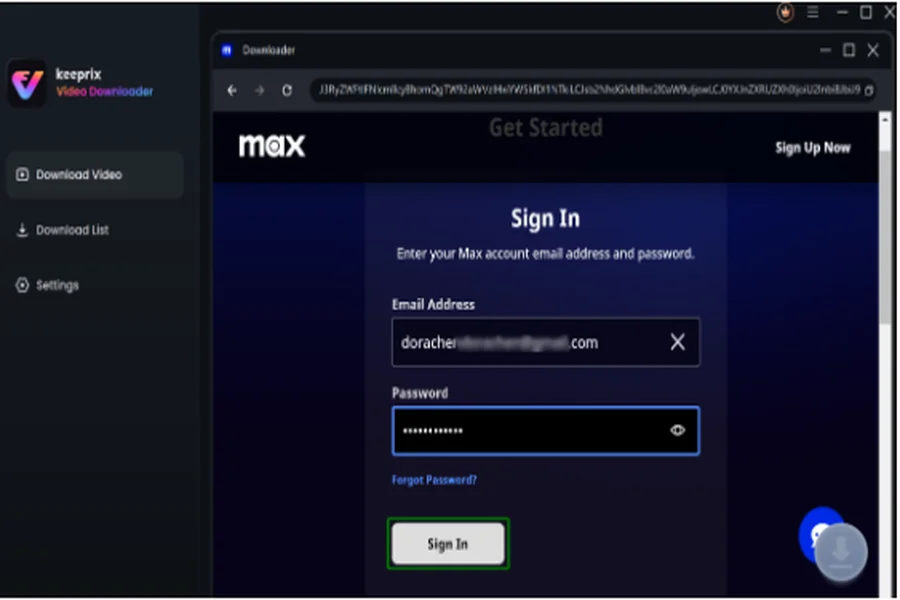
Step 2. Search for the movie or TV show you want to download and click Download button.

Step 3. Click the Download icon to begin saving it to your device.

Conclusion
In summary, we have outlined four simple methods to download Game of Thrones and watch all eight seasons. For a secure and versatile option, Keeprix Video Downloader is an excellent choice. This software allows you to download all eight seasons of Game of Thrones without any expiration or limitations from HBO Max. Download Keeprix Video Downloader for free today!