How AI Image Creation Is Redefining the Way People Plan, Test, and Present Creative Ideas
Every creative project involves decisions that are easier to make when an idea can be seen rather than simply described. An architect may want to explore the atmosphere of an interior, a marketer may need to compare campaign concepts, or an independent creator may be searching for a visual that captures the personality of a new brand. Before the final design takes shape, these professionals need a way to examine possibilities and decide which direction makes the most sense.
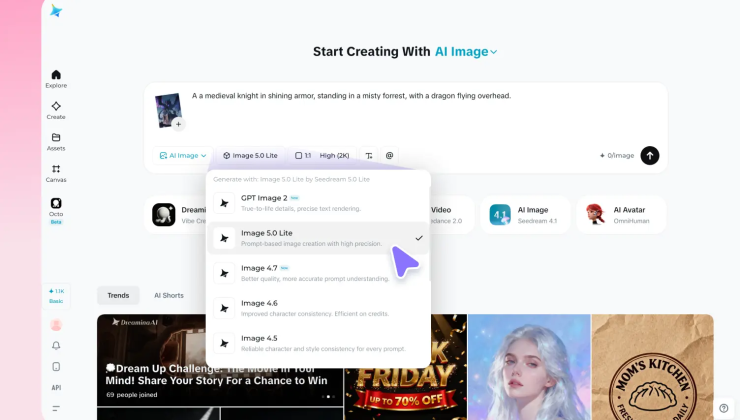
Artificial intelligence is creating new opportunities at this early stage of visual development. Instead of depending entirely on reference photographs, rough sketches, or lengthy manual drafts, creators can describe an idea in ordinary language and explore possible interpretations. An ai image generator can turn those descriptions into visual concepts, giving users something concrete to evaluate, discuss, and improve.
The biggest advantage of this approach is the ability to experiment before making expensive or time-consuming commitments. A visual draft can reveal whether a concept feels too crowded, whether its atmosphere suits the intended audience, or whether the main subject communicates the right message. Tools such as Dreamina make this process accessible to people with different levels of design experience, although the quality of the result still depends on clear instructions and thoughtful review.
Why Visual Planning Deserves More Attention
Creative teams sometimes move directly from an initial idea to production without exploring enough alternatives. This can lead to designs that look polished but fail to communicate the intended message. Visual planning creates an opportunity to identify weaknesses early, when changing direction is generally easier than revising a finished project.
Imagine a company preparing to launch a premium skincare product. One concept could emphasize botanical ingredients, another could focus on clean laboratory-inspired surroundings, and a third could present the product within an everyday self-care routine. Each direction communicates a different brand personality. Comparing preliminary images helps the team determine which approach best fits its audience before arranging photography, packaging design, or advertising materials.
This method can also reduce misunderstandings between clients and designers. A client may describe a visual as elegant or modern without knowing how to translate those words into specific design choices. Showing several interpretations creates a more useful discussion about lighting, color, composition, and atmosphere. Instead of relying on vague descriptions, both parties can respond to something they can actually see.
How Better Prompts Lead to More Useful Images
Generating a visual concept begins with communicating the right information. A short instruction may be enough for casual experimentation, but projects with a defined purpose usually benefit from more detailed prompts. The creator should identify the main subject, describe its surroundings, and explain the visual qualities that matter most.
For example, a request for a picture of a home office leaves many details open to interpretation. A stronger description might specify a compact workspace beside a large window, a natural wooden desk, soft morning light, a neutral color palette, and an uncluttered composition. If the image will be used on a website, the prompt can also request empty space on one side for a headline.
A useful strategy is to separate essential requirements from optional creative details. The subject, setting, and intended use should guide the first generation. Once the basic composition works, additional instructions can refine the lighting, perspective, textures, or mood. Changing too many elements at once makes it difficult to understand why one version performs better than another.
Creators should also recognize that prompts are instructions, not guarantees. An image model may interpret a request differently than expected, omit details, or introduce inconsistencies. Reviewing the result and adjusting the description is therefore a normal part of the workflow rather than a sign that the process has failed.
Where AI Image Creation Fits Into Professional Work
Visual generation is useful in situations where teams need to communicate ideas before producing finished assets. Marketing departments can compare campaign themes, publishers can explore illustration directions, and small businesses can develop early concepts for seasonal promotions. The technology is especially valuable when the purpose is to investigate a visual direction rather than produce a final, publication-ready image immediately.
Independent creators can also use image generation to develop mood boards and creative references. A video producer might explore the appearance of a fictional location before building a scene, while a writer could create visual references that help maintain a consistent atmosphere throughout a story. These drafts provide a shared point of reference that can make later creative decisions more focused.
Educational projects offer another practical application. An instructor could create an illustrative scene to introduce a scientific concept or help students imagine a historical environment. However, factual details must be checked carefully because generated images can contain convincing but inaccurate information. In these situations, the image should support learning rather than serve as unquestioned evidence.
Making Experimentation Affordable for Independent Creators
Large creative projects often require specialist software, commissioned artwork, photography, and multiple rounds of revisions. For freelancers and small businesses with limited budgets, those expenses can make early experimentation difficult. Exploring a concept before commissioning a final asset can help clarify requirements and prevent unnecessary revisions later.
A free ai image generator can provide an accessible starting point for testing ideas, depending on the platform’s current free-use limits and available features. Users can explore possible compositions, compare visual moods, and develop a clearer brief before investing in professional production. This can be particularly helpful for people who are still learning which visual direction suits their project.
Affordability should not be confused with guaranteed commercial readiness. Some generated images may require additional editing, and specific projects may need precise product details, consistent branding, or technical adjustments. Users should review the applicable licensing terms and usage restrictions before publishing or selling generated work. The best approach is to use early generations to improve decision-making and then determine what level of finishing the project requires.
Building a Consistent Look Across Multiple Images
A single image can look impressive while a collection of images feels disconnected. This becomes a problem when a business needs visuals for its website, social media, advertisements, and product pages. A recognizable visual identity depends on maintaining a reasonably consistent relationship between colors, lighting, composition, and overall tone.
One practical solution is to create a brief visual guide before generating a series of images. The guide can describe the preferred color palette, lighting style, background treatment, and atmosphere. Including these characteristics in related prompts gives the images a shared direction, even when their subjects differ.
For example, a travel company might choose natural light, realistic scenery, understated colors, and candid compositions for its promotional visuals. Applying these preferences across different destinations can help maintain a recognizable style. Nevertheless, AI models may interpret instructions inconsistently, so the results should be reviewed together rather than judged as isolated images.
Logos, precise typography, and important brand elements may need to be added or corrected with dedicated design software. A final quality check should also confirm that the images fit their intended dimensions and remain clear when displayed on smaller screens.
Responsible Decisions Matter as Much as Creativity
The ability to create convincing imagery brings responsibilities that should not be overlooked. Generated visuals can misrepresent real products, alter recognizable people, or depict events that never occurred. When an image communicates factual information, represents a customer-facing product, or appears in journalism, its accuracy deserves particular attention.
Creators should avoid presenting imaginary product features as real, use personal photographs only with appropriate permission, and be cautious when uploading confidential material to online platforms. They should also consider copyright, privacy, and the terms governing generated content. Requirements can differ according to the platform and the intended use, so checking the relevant rules is an important step.
Ethical use does not restrict creativity. Instead, it helps ensure that visual experimentation produces work that can be used responsibly. By combining imaginative exploration with careful verification, creators can develop compelling images without sacrificing accuracy or audience trust.
Turning Visual Experiments Into Better Creative Decisions
The most productive image-generation workflow does not end when a promising picture appears. It continues through evaluation, comparison, and refinement. Creators should ask whether the image communicates the intended idea, whether the composition guides attention toward the right subject, and whether the visual style fits the audience and publication context.
Keeping notes about successful prompts can make future projects easier. A creator might record which lighting descriptions worked well, which compositions left enough room for text, or which instructions produced distracting backgrounds. Over time, these observations become a practical reference for making better creative choices.
It is equally important to know when to stop experimenting. Generating dozens of similar images does not necessarily improve a project. Once a concept communicates the message effectively and meets the requirements, attention can shift toward editing, presentation, and final quality control. The objective is to create a useful visual, not simply to generate as many variations as possible.
Final Thoughts
AI image creation is changing the way people approach visual planning by making it easier to explore ideas before committing to a finished design. From business campaigns and educational illustrations to creative references and early product concepts, these tools can help turn uncertain thoughts into visuals that support clearer decisions.
The strongest outcomes come from combining accessible technology with human judgment. Clear prompts establish direction, experimentation reveals alternatives, and careful review ensures that the final image serves its intended purpose. When creators use this process thoughtfully, AI-generated visuals become more than convenient drafts. They become a practical part of developing ideas, communicating intentions, and producing better creative work.
Frequently Asked Questions
1. What can AI image creation be used for?
It can support concept development, marketing visuals, illustrations, mood boards, educational materials, social media graphics, and early product presentations. The appropriate use depends on the quality and requirements of the final project.
2. Do users need professional design experience?
No. Beginners can start with simple descriptions and improve their prompts through experimentation. Familiarity with composition, lighting, and color can help, but it is not essential for exploring initial ideas.
3. How can someone get more accurate results?
Describe the subject, setting, composition, lighting, and intended mood clearly. Review each result, identify what needs improvement, and refine a few instructions at a time.
4. Can AI-generated images be used commercially?
Commercial use depends on the platform’s current terms, the image’s content, and any applicable legal restrictions. Users should verify usage rights and review the image for potentially misleading or unauthorized material before publication.
5. Are generated images always ready to publish?
No. Some images may contain distorted details, inconsistent objects, or unsuitable compositions. Editing and quality checks can be necessary to make an image appropriate for a professional project.
6. Does AI replace human creativity?
AI can help generate and explore visual possibilities, but people still define the purpose, select the strongest concepts, make ethical decisions, and determine whether the result communicates effectively. Human judgment remains central to the creative process.