Anime-Style Music Videos Made with AI: What’s Possible Now
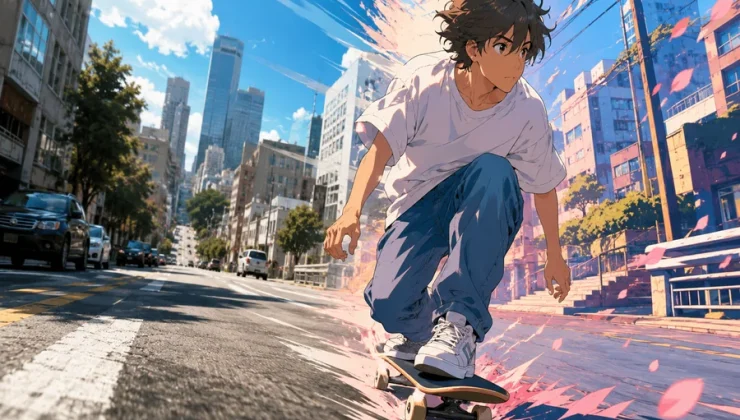
Anime-style music videos have become more accessible than ever. What once required a team of animators, illustrators, video editors, and motion designers can now be explored with a combination of artificial intelligence tools. Independent musicians, content creators, and anime enthusiasts can experiment with visual storytelling without having years of animation experience.
AI-generated anime videos are not necessarily a replacement for traditional animation. Instead, they offer a new creative approach that makes it easier to turn musical ideas into visual experiences. From dreamy character portraits to action-packed sequences, creators can explore different styles and build videos that match the mood of their music.
But what can these tools actually do today? How much creative control do they offer, and what should musicians know before starting their first AI anime music video?
Let’s explore the possibilities.
Why Anime and Music Work So Well Together
Anime has always had a strong relationship with music. Japanese animated films, television series, and music videos often use visual storytelling to communicate emotions that lyrics alone cannot express.
A slow song might feature a character walking through a rainy city, while an energetic track could be accompanied by fast-moving scenes, dramatic lighting, and expressive character animations.
This combination works because anime offers considerable artistic flexibility. Creators can experiment with:
- Colorful fantasy environments and imaginary worlds.
- Expressive characters with recognizable personalities.
- Dramatic lighting and cinematic camera angles.
- Emotional facial expressions and character interactions.
- Surreal transitions that follow the rhythm of a song.
AI video generation makes these visual ideas easier to explore. Instead of drawing every frame manually, creators can describe a scene, generate visual references, and transform selected images into moving sequences.
What AI Anime Music Video Generators Can Do Today
The current generation of AI video tools can produce surprisingly creative results. However, their capabilities vary depending on the platform, model, and input material.
Here are some of the most interesting possibilities.
1. Turning Written Ideas into Animated Scenes
Text-to-video generation allows creators to describe a scene using ordinary language.
For example, imagine a music video featuring a young anime character standing on a rooftop while cherry blossom petals move through the air. The city skyline glows in the background, and the camera slowly moves closer to the character.
A creator can describe this scene in a prompt and use an AI video model to generate a short clip.
The results may not always match the original idea perfectly, but the technology makes visual experimentation much faster.
This approach is particularly useful for independent musicians who have a clear concept but lack the resources to hire an animation team.
2. Animating Existing Anime Artwork
Another popular approach is image-to-video generation.
Rather than creating everything from a written description, creators can start with an existing illustration or an AI-generated anime character image.
The image becomes the visual foundation for an animated scene.
Depending on the tool, creators may be able to introduce:
- Moving hair and clothing.
- Blinking eyes and subtle facial expressions.
- Background movement.
- Camera zooms and pans.
- Atmospheric effects such as rain, snow, or glowing particles.
This technique can help maintain a more consistent artistic direction because the original image establishes the character’s appearance and overall composition.
However, generating several scenes with the same character can still be challenging. Small differences in facial features, clothing, or proportions may appear between clips.
3. Creating Visuals That Match Different Music Genres
One of the most exciting aspects of AI-generated music videos is the ability to experiment with different visual aesthetics.
A creator working on a relaxing lo-fi track might choose soft pastel colors, quiet streets, sunset lighting, and peaceful character expressions.
A rock or electronic music video could use a completely different direction, featuring futuristic cities, intense action, neon lighting, and rapid scene transitions.
Some interesting combinations include:
| Music Genre | Possible Anime Visual Style |
| Lo-fi | Rainy windows, cozy rooms, peaceful city scenes |
| J-pop | Colorful characters, bright backgrounds, energetic movement |
| Electronic | Futuristic environments, neon effects, abstract visuals |
| Rock | Dramatic action, powerful expressions, cinematic scenes |
| Ambient | Dreamlike landscapes, slow camera movement, atmospheric lighting |
| Hip-hop | Urban environments, streetwear-inspired characters, bold colors |
The important thing is to treat the music and visuals as parts of the same creative project rather than generating unrelated clips and putting them together.
4. Exploring AI Tools for Anime Video Creation
There are several ways to approach AI anime video production, depending on the type of project and the amount of creative control required.
For beginners who want to experiment with anime-inspired video creation without learning complicated animation software, a free ai anime video generator online can be one of the tools worth exploring.
Other platforms offer different capabilities that may be useful for specific stages of production.
Runway
Runway provides AI-powered video generation and editing capabilities. Creators can experiment with text-to-video and image-to-video workflows, making it useful for producing individual scenes and visual sequences.
Kling AI
Kling AI is another option for generating videos from text and images. Its motion generation capabilities make it interesting for creators who want to animate characters and build cinematic scenes.
Pika
Pika focuses on accessible AI video creation and creative visual effects. It can be useful for experimenting with short clips, stylized scenes, and unusual visual transformations.
Luma AI
Luma AI offers video generation tools that can help creators explore cinematic movement and transform visual concepts into short video sequences.
Each platform has its own strengths, limitations, subscription options, and generation settings. Some provide free credits or limited free access, while more advanced features may require a paid plan.
Rather than choosing a tool simply because it produces attractive demonstrations, creators should test how well it handles their preferred anime aesthetic, character consistency, and motion requirements.
How to Build an Anime Music Video Using AI
A good AI-generated music video usually requires more than a single prompt. Planning the visuals before generating clips can make the final result considerably more coherent.
Here is a practical workflow.
Step 1: Choose the Music and Overall Concept
Start by selecting the track you want to use.
Listen to it carefully and identify its main emotional direction. Is it romantic, energetic, melancholic, mysterious, or uplifting?
Then develop a simple visual concept.
For example, a three-minute romantic song could follow a character experiencing different stages of a relationship, from meeting someone for the first time to remembering shared moments.
You do not need a complicated storyline. Even a collection of connected scenes can create an effective music video.
Step 2: Divide the Song into Scenes
Break the music into smaller sections.
A simple structure might look like this:
- Introduction: Establish the main character and environment.
- First verse: Introduce the visual story.
- Chorus: Use more expressive and visually interesting scenes.
- Second verse: Develop the story with new locations or interactions.
- Final chorus: Build toward the strongest visual moments.
- Outro: Finish with a memorable final image.
This structure provides a starting point for deciding which scenes need to be generated.
Step 3: Develop Consistent Character References
Character consistency is one of the biggest challenges in AI-generated anime videos.
If the same character appears in multiple scenes, their hairstyle, clothing, eye color, and facial features should remain recognizable.
A useful technique is to generate a character reference image before creating the actual video clips.
Keep the reference image available throughout production and use similar descriptions whenever generating new scenes.
You can also create several reference images showing the character from different angles.
This does not guarantee perfect consistency, but it can reduce noticeable differences between scenes.
Step 4: Generate Short Video Clips
Instead of attempting to generate an entire music video at once, create individual clips.
Short sequences are easier to review, replace, and rearrange.
For example, a 15-second section of a song might use three different five-second scenes.
Experiment with camera movement, character actions, lighting, and background details.
It is also worth generating multiple versions of important scenes. AI video generation can be unpredictable, and the first result may not always be the best.
Step 5: Edit Everything to Match the Music
Once the clips are ready, bring them into a video editing application.
Tools such as DaVinci Resolve, Adobe Premiere Pro, or CapCut can help arrange the scenes and synchronize them with the soundtrack.
Pay particular attention to transitions and musical timing.
A scene change during a strong beat can make the video feel more energetic. Slower transitions may work better during emotional or atmospheric sections.
You can also add subtitles, lyrics, visual effects, and color adjustments to create a more polished result.
Step 6: Review the Final Video
Before publishing, watch the complete video from beginning to end.
Check for inconsistent characters, strange movements, distorted hands, sudden visual changes, and scenes that do not match the music.
Also make sure that the soundtrack and any visual assets are legally usable.
A few minutes of careful editing can make a significant difference to the overall quality.
The Biggest Challenges of AI Anime Music Videos
Although AI tools have made video creation easier, there are still limitations worth understanding.
Character Consistency
Keeping the same character recognizable across multiple scenes remains difficult.
Even when using reference images, AI models may change facial details, clothing, or body proportions.
Creators should use reference images, consistent prompts, and careful editing to minimize these differences.
Unnatural Movement
Some AI-generated clips contain unusual body movements, inconsistent physics, or strange transitions.
These issues become especially noticeable when characters perform complicated actions.
Simple movements, such as walking, turning, or looking toward the camera, may produce more reliable results than complex choreography.
Limited Creative Control
Traditional animation gives artists detailed control over individual frames.
AI generation is different. Creators generally provide instructions and select the best results rather than controlling every movement precisely.
This can be frustrating when a particular scene needs to match an exact creative vision.
Generation Time and Costs
Generating several versions of a scene can consume credits and take time.
Longer projects may require multiple subscriptions or paid generation plans.
It is therefore useful to plan the video before starting production instead of generating dozens of unrelated clips.
Copyright and Publishing Considerations
Music video creators should also consider copyright before publishing their work.
Using copyrighted songs without permission can lead to content identification claims, monetization restrictions, or removal requests on platforms such as YouTube.
The same consideration applies to visual assets. Not every anime character, illustration, or reference image is free to use commercially.
AI-generated content also raises questions about ownership and commercial rights, which can vary depending on the platform, jurisdiction, and source material.
Before releasing a video commercially, review the terms of the AI tools you use and make sure you have the necessary rights to the music and visual elements.
For independent creators, using original music, properly licensed tracks, and original character designs is generally a more straightforward approach.
Where AI Anime Music Videos Are Heading
AI video generation is developing quickly, and future improvements could make anime-style music production even more accessible.
Several developments are particularly interesting.
Better character consistency: Improved reference systems could help maintain the same characters across longer sequences.
More natural animation: Advances in motion generation may reduce distorted movements and make character actions look more convincing.
Longer video generation: Better temporal consistency could make it easier to create connected scenes without relying on so many separate clips.
Improved audio synchronization: More advanced tools may eventually make it easier to coordinate visual movements, scene transitions, and musical elements.
Greater creative control: Future systems may provide more precise control over camera angles, character actions, and individual visual elements.
These developments could create new opportunities for independent musicians, anime creators, and small production teams.
Final Thoughts
AI has opened up an interesting new direction for anime-inspired music videos. Creators can now experiment with characters, environments, animation styles, and cinematic sequences without following the traditional animation production process.
However, the technology is only one part of the creative process. A compelling music video still needs a clear concept, suitable visuals, thoughtful editing, and a strong connection between the soundtrack and the scenes.
The best results usually come from combining AI generation with human creativity and careful post-production.
For independent musicians and aspiring animators, this is an exciting time to experiment. What previously required substantial production resources can now begin with a simple idea, a few reference images, and the right combination of creative tools.