Cancel 3 Subscriptions Today: Why TeraBox AI Workspace is All You Need
I did an audit of my recurring charges last quarter and found six AI subscriptions. Not six tools I use daily. Six tools I pay for, three of which I had not opened in over a month.
That is how AI spending creeps up. You sign up for a presentation builder before a pitch. An image generator for one campaign. A transcription app after a meeting you could not remember. Each one solved a real problem on the day you subscribed. Then the problem passed and the charge stayed.
The question I wanted answered was practical. Could a single AI workspace handle enough of that work to let me cancel most of them? I tested TeraBox AI Workspace across three categories to find out.
The Subscription Math: How Much Could You Save in a Year?
Here is a common stack for someone producing content solo, at current published rates:
|
Tool |
Purpose |
Monthly |
Annual Billing |
|
Gamma Pro |
Presentations |
$20 |
$15/mo |
|
Midjourney Standard |
Image generation |
$30 |
$24/mo |
|
Otter Pro |
Transcription and notes |
$16.99 |
$8.33/mo |
|
Total |
$66.99 |
$47.33/mo |
That is roughly $800 a year on monthly billing, or about $568 if you commit annually to all three.
Two things worth noting before treating that as savings. Prices change often, so check current rates before budgeting. And these are individual plans. Team seats multiply the number quickly.
The real comparison is not just cost. It is whether one platform covers the same work well enough that canceling does not cost you more in time than it saves in money.
Subscription 1 to Cancel: Standalone Presentation Builders
Tool tested: AI Presentation Maker Agent
What I Used and How
I had a written project summary from a client website redesign: current status, wins, open issues, budget spent, and next steps. About 400 words in a text file.
The interface puts one input box in the center. Under it sits a slide count dropdown, a language selector, an upload button, and a mode choice between Agent and Standard. I uploaded the summary file rather than typing a prompt, set the range to 10-15 slides, and picked Agent mode, which handles both content structure and visual design rather than dropping text into a fixed template.
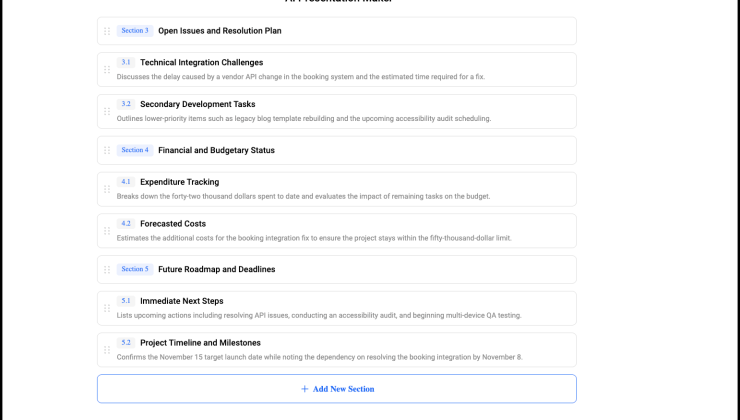
Before generating, it produced an outline. That step matters. I could see the slide order and section headings before committing, and I moved the budget slide ahead of the open-issues slide because the client cares about spend first.
What I Got
Twenty-two slides in a little over two minutes. Structure followed my edited outline. The budget figures carried over accurately, which was the first thing I checked.
What Needed Adjustment
A few slides also had four or five bullets and felt too dense for a presentation. I shortened those manually, and one long heading needed resizing because it wrapped onto two lines.
Agent mode can add citations when outside web sources are used. For this internal deck, which was mainly based on my own project document, I removed two citations that were not useful.
I saved the finished presentation back to TeraBox, so the source document and deck stayed together.
Could It Replace the Subscription?
For internal decks and client updates, yes. The outline-before-generation step is genuinely useful and not something every dedicated builder offers. Where it does not replace a specialist is strict brand templating. If your decks must match a corporate system exactly, keep the dedicated tool.
For my normal presentation work, though, this was enough for me to cancel the separate paid presentation subscription.
Subscription 2 to Cancel: Isolated Image & Video Generation Tools
What I Used and How
I focused on Photo to Photo rather than generating an image from text.
My input was a plain product photo: a ceramic mug on a white desk, shot on a phone, decent lighting, boring composition. Exactly the kind of image that needs work before it goes on a blog.
My prompt:
"Transform this into a warm lifestyle scene. Place the mug on a wooden table near a window with soft morning light. Keep the mug's shape and color exactly as they are."
What I Got
Three variations, roughly 30 seconds each.
One was genuinely usable. The wooden surface and window light looked natural, and the mug kept its proportions.
The second changed the mug's glaze color from matte cream to a warmer beige. For a lifestyle blog image, that would not matter. For product photography, it absolutely would, and it is worth knowing the tool will drift on the subject if you let it.
The third put the mug at an angle that did not match the original perspective and looked off.
What Needed Adjustment
I re-ran the first result with a stricter instruction, adding "do not alter the mug's color, texture, or angle in any way." That produced a cleaner result on the first try. The lesson is that constraint language does more work here than descriptive language.
The output saved to the same folder as the draft it was for, which removed the download-then-reupload step I normally do.
Could It Replace the Subscription?
For improving photos you already have, yes. Background swaps, lighting fixes, and scene changes are exactly the kind of edits it handles well. It also supports text-to-image generation, so it is not limited to photo transformation only.
Where it still falls short is advanced image editing. If you need precise retouching, detailed object control, or a more professional editing workflow, a dedicated tool still makes more sense. I downgraded the separate image subscription instead of keeping the full paid plan. TeraBox covered most of the everyday image work I needed, but I would still keep a dedicated tool around for more specialized projects.
Subscription 3 to Cancel: Separate Note & Transcription Apps
What I Used and How
AI Notebook works with source material and turns it into different outputs. Its Studio tools include Quiz, Mind Map, Flashcard, and AI Slides.
I pasted in roughly 350 words of messy notes from a client call, then ran both a summary and a Mind Map.
What I Got
The transcript was accurate on ordinary conversation. Two product names came through wrong, which is The summary organized the call into clear themes and caught three of four action items with the right owner.
The mind map was more useful. Laid out as branches, it made obvious what the prose buried: the timeline branch had no resolution attached.
The summary was well organized and correctly assigned three of four action items.
What Needed Adjustment
My notes described two possible launch dates and said explicitly that nothing was decided. The summary listed the later date under decisions.
AI summarizers resolve ambiguity because a clean summary reads better than an accurate one, and a client would have believed a date was agreed. The mind map got it right, showing both options with no conclusion.
Could It Replace the Subscription?
Partly.
If most of the value you get from a transcription app comes after the meeting, such as organizing notes, creating summaries, or turning information into something easier to review, AI Notebook covers a lot of that work.
Quiz and Flashcard generation also make it useful outside meetings. Since YouTube videos can be used as source material, I can see it working well for lectures, tutorials, and other study material that you want to revisit later.
What it does not replace is live meeting capture. If you need a bot that automatically joins calls and records the conversation for you, you still need a separate service for that part.
I kept my transcription app on its free tier for occasional recordings and used Notebook for more of the follow-up work.
The Real Savings Go Beyond Money
The biggest benefit of an integrated platform was having the project files and AI tasks in the same place. With one account, I could handle different types of work without constantly moving between separate apps.
Keeping the source notes, generated images, and presentation files together also made file management easier. When I needed to make changes later, everything was still easy to find in the same workspace.
Tera AI made switching between tasks easier too. I could work with uploaded files, create presentations, and handle image-related tasks from the same main interface. Overall, the workflow felt much more organized and easier to manage.
Can You Really Cancel All Three? Who Gets the Most Value
Not all three in my case. I canceled one subscription and downgraded two.
An integrated workspace makes the most sense if you:
● Handle several types of work, such as writing, presentations, images, and research
● Run a small business without a dedicated design or marketing team
● Use the same workspace for essays, presentations, lectures, and study materials
● Work on a small team where one person handles several different tasks
A specialist tool may still make sense if you:
● Need advanced design, video editing, or other specialist controls
● Rely on strict brand templates or shared asset libraries
● Need live meeting capture with a bot joining calls automatically
● Work with confidential or regulated material and need to check specific data or compliance requirements before uploading files
FAQs
Does an all-in-one AI tool mean one tool does everything?
Not exactly. An all-in-one AI tool brings different AI tasks into one workspace rather than making every feature identical. With Tera AI agent, for example, you can work with files, generate images, and create presentations from the same main interface, while each task still has its own workflow.
Is TeraBox free?
TeraBox has both free and paid options, but access and usage limits vary across AI features. Check the current plan details before deciding whether the tools you need are included.
How much can an all-in-one AI workspace actually save?
It depends on which subscriptions you can replace or downgrade. In my case, I canceled one paid subscription and moved two others to lower-cost or free options. The bigger saving came from paying less for tools I only used occasionally.
When is a specialist AI tool still worth keeping?
A specialist tool still makes sense when you need advanced controls for a specific type of work, such as detailed image editing, strict brand templates, professional video production, or live meeting capture. For everyday mixed tasks, an integrated workspace may cover enough that you do not need a separate paid app for every step.
Conclusion
An all-in-one AI tool does not need to replace every specialist app. For everyday work, the bigger value is having more of your workflow in one place and relying less on tools you rarely use.
Before your next billing cycle, try running one real project from start to finish in TeraBox. If you barely need to open some of your other subscriptions, that is a good sign they may no longer be worth paying for.