How Multiple Face Swaps Power Story Videos
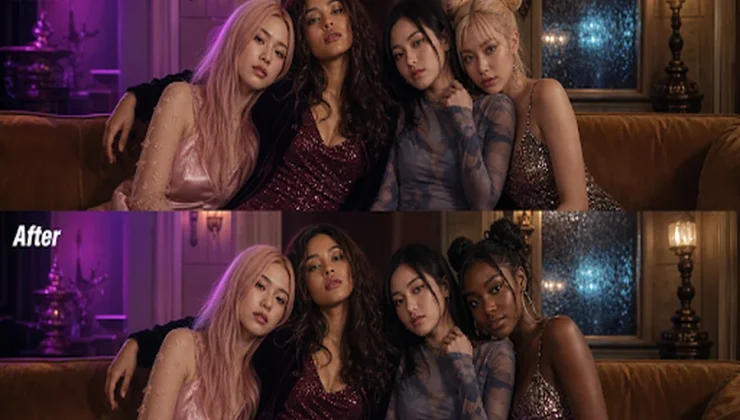
A single face swap can create a visual joke, but several face swaps can turn a short video into an interactive story. You can place different viewers, friends, customers, or fictional characters into the same scene, then let the audience shape what happens next. The result feels more personal because the viewer is not only watching the story. They’re part of it.
The key is to treat face swapping as a storytelling tool, not a visual trick added at the end. Each face should have a clear role, a consistent emotion, and a reason to appear in the scene. Tools such as EasyFaceSwap make it easier to test this approach, especially when you’re creating short videos with several character changes.
Three Ways to Use Multiple Face Swaps
Interactive storytelling works best when the audience has a simple choice to make. They might choose which character to become, decide who enters the scene, or follow a different ending. Multiple face swaps support these choices by giving each version of the story a visible identity.
A useful example is a branching comedy video. Imagine a character arriving late to a dinner, a meeting, or a wedding. The viewer can swap their face onto the late arrival, the annoyed host, or the friend covering for them. Each role can lead to a different punchline, so the same footage becomes several personalized stories instead of one fixed clip.
The benefit is stronger audience participation. A person is more likely to share a video when they can say, “That’s me as the terrible boss,” or send a version featuring a friend in an unexpected role. This format also gives creators more mileage from one shoot, since new combinations can be produced without filming an entirely different scene.
A second scenario is an educational story. A museum, language teacher, or history creator could build a short scene with several speaking characters. One viewer might appear as the guide, another as a historical figure, and a third as a visitor asking questions. The swaps help make an abstract lesson feel like a conversation rather than a lecture.
This approach is useful because it gives viewers a reason to pay attention to the relationships between characters. A language learner can practice a dialogue by taking one role, then watch the same scene from another character’s point of view. The creator can also produce several difficulty levels by changing the dialogue while keeping the visual structure intact.
A third scenario is a brand or community campaign. A local theater could let supporters appear in a backstage story, while a sports club could create a locker room scene with fans taking the roles of players or coaches. A nonprofit might use the format to show how different people experience the same issue, with each face swap representing a distinct perspective.
The benefit here is emotional connection. People respond to campaigns that give them a place inside the message, but the story still needs to feel natural. A face swap should support the campaign’s point, not distract from it or make a serious subject seem like a novelty.
Plan the Story Before Swapping Faces
Start with a short script that has a beginning, a clear choice, and a payoff. For a 30 to 60 second video, two or three roles are often enough. More characters can work, but every additional face creates another set of decisions around timing, expression, lighting, and continuity.
Write the story so each role has a purpose. Avoid making one character speak only because you want to show another swap. If the viewer can take the role of the detective, the suspect, or the witness, each part should reveal something different. The interaction becomes more engaging when changing roles changes what the viewer understands.
It helps to create a simple planning table before recording. This is not a production checklist. It’s a quick way to connect each face with a story function and the footage needed to make the swap believable.
| Story element | What to decide | Why it matters |
|---|---|---|
| Character role | Who does the viewer become? | Gives the swap a clear purpose |
| Scene position | Where does that face appear? | Keeps framing and scale consistent |
| Emotion | What should the character feel? | Guides the source image and performance |
| Story choice | What changes after the swap? | Makes the video interactive |
| Ending | What result does the viewer get? | Provides a satisfying payoff |
Film the base scene with continuity in mind. Keep the camera angle, lighting, and distance from the lens as consistent as possible. If one character is close to the camera and another stands in deep shadow, the swap may look uneven even when the source image is good.
Ask performers to pause briefly before and after key lines. Those extra moments give you cleaner editing points and make it easier to create alternate versions. They also reduce the chance that a face changes during a fast movement or gets covered by a hand, prop, or another character.
Choose source images that match the performance. A front-facing image with even light may work well for a character looking at the camera, but it may not translate neatly to a profile shot. Expressions matter too. A smiling source face placed over an angry performance can produce an amusing result in a comedy, but it may weaken a serious scene.
Build a Practical Face Swap Workflow
Once the footage is ready, identify the exact moments where each face should appear. For a multiple face swap video, it’s usually better to work in short sections instead of trying to process an entire long scene at once. Short clips are easier to review, revise, and compare.
Begin with one character and one scene. Check the face position, skin tone, expression, edges, and movement before adding more swaps. If the first result has problems, fixing them early saves time. A weak base clip can make every later version harder to manage.
Next, apply the other faces one at a time. Keep the same naming system for your files, such as “scene one host,” “scene one guest,” and “scene one viewer.” Clear names matter when you have several versions with similar timing. They also make it easier to return to an earlier draft after feedback.
Review the video at normal speed first, then slow it down around transitions. A face may look convincing in a still frame but shift strangely when the person turns, speaks quickly, or moves into different light. Look for sudden changes in size, sharp edges around hair, unnatural blinking, and expressions that do not match the dialogue.
Editing can hide some technical imperfections, but it cannot fix every problem. A cutaway, reaction shot, or quick change in camera angle can help when a swap breaks during movement. Still, don’t use rapid cuts to cover every weak result. The audience may forgive a playful visual glitch, but repeated problems make the story feel unfinished.
For interactive delivery, give viewers a clear instruction. They might choose a role through a comment, select a version from a landing page, or use a personalized upload process. Keep the choice simple and explain what the viewer will receive. If people have to guess how to participate, many will leave before seeing the payoff.
Protect Trust While Keeping It Fun
Permission is essential when you use someone’s face. Get clear approval from every person whose likeness appears, especially if the video will be published, used in advertising, or shared beyond a private group. A written agreement should explain where the video will appear, how long it may be used, and whether the person can ask for changes.
Use the same care with public figures and fictional characters. A face swap can suggest that someone said or did something they never said or did, even when the video is meant as a joke. Label altered footage when viewers could reasonably mistake it for a real event, and avoid placing real people into harmful, sexual, political, or criminal scenarios without explicit permission.
Privacy also matters during production. Store source images and finished clips securely, limit access to the people working on the project, and delete files you no longer need. If viewers submit their own photos, tell them how the images will be handled. Clear communication builds more trust than a clever effect ever can.
Finally, test the story with people who did not make it. Ask them which character they thought they were playing, what choice they believed they had, and where the story became confusing. Their answers will reveal problems that are easy to miss when you already know the script.
Conclusion
Multiple face swaps can make interactive videos feel personal, playful, and worth sharing. The strongest examples begin with a real story choice, then use face swapping to place the viewer inside that choice. A comedy can offer different roles, an educational video can turn into a dialogue, and a campaign can help people see themselves in the message.
Keep the cast small, film with consistent lighting, test each swap before building more versions, and edit for clarity rather than spectacle. Most importantly, get permission and explain when footage has been altered. Used with care, multiple face swaps can extend one short production into a set of engaging stories without losing the human connection that makes interactive video work.